> For the complete documentation index, see [llms.txt](https://pancake-crm.gitbook.io/pancake-crm_en/llms.txt). Markdown versions of documentation pages are available by appending `.md` to page URLs; this page is available as [Markdown](https://pancake-crm.gitbook.io/pancake-crm_en/ii.-pancake/2.4.-manage-comments-and-messages/2.4.2.conversation-filter.md).
# 2.4.2.Conversation Filter
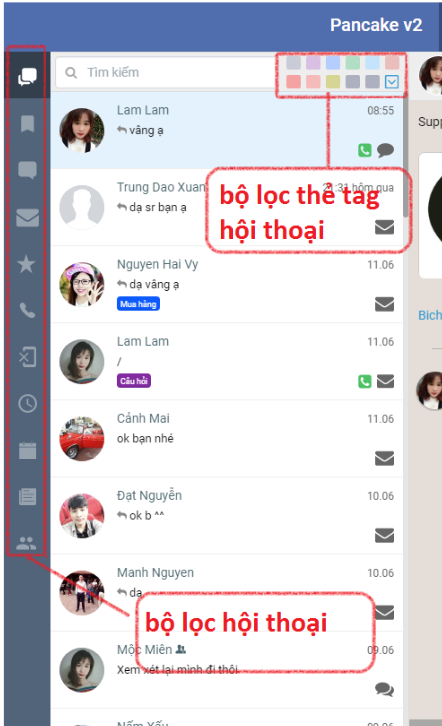
**Pancake has conversation filters for you to use according to your needs**
**1.Show all:** Show all conversations in the interface
**2.Unread filter:** filters new unread conversations. Conversations are marked in orange.\
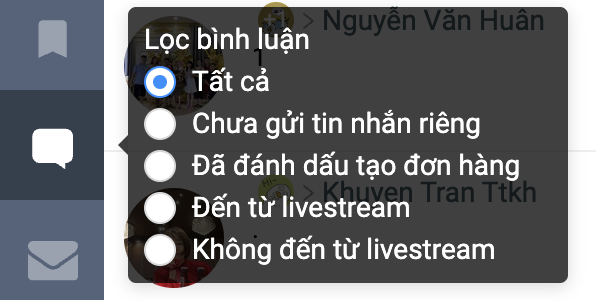
**3.Filter comments**
**4.Message filtering:** conversation filtering is messaging
**5.Filter conversations with Phone NumberNumbers.**
**6.Filter without Phone Number.**
**7.Filter Unanswered** (conversations where the last responder was a customer)
**8.Filter by time period.**
**9.Filter by article or filter by staff assigned to the conversation** and filter Filter by conversation tag You can use dual filters
 **2.Unread filter:** filters new unread conversations. Conversations are marked in orange.
 \
**3.Filter comments**
\
**3.Filter comments**
 **5.Filter conversations with Phone NumberNumbers.**
  **6.Filter without Phone Number.**
  **7.Filter Unanswered** (conversations where the last responder was a customer)
**8.Filter by time period.**
**9.Filter by article or filter by staff assigned to the conversation** and filter Filter by conversation tag You can use dual filters
**7.Filter Unanswered** (conversations where the last responder was a customer)
**8.Filter by time period.**
**9.Filter by article or filter by staff assigned to the conversation** and filter Filter by conversation tag You can use dual filters